1.URL
http://124.223.60.234:18080/tms/help/getLatestDocs
2.请求参数
2.1请求头
在Headers里面增加token:对应登录验证成功后,data里面对应的tokenId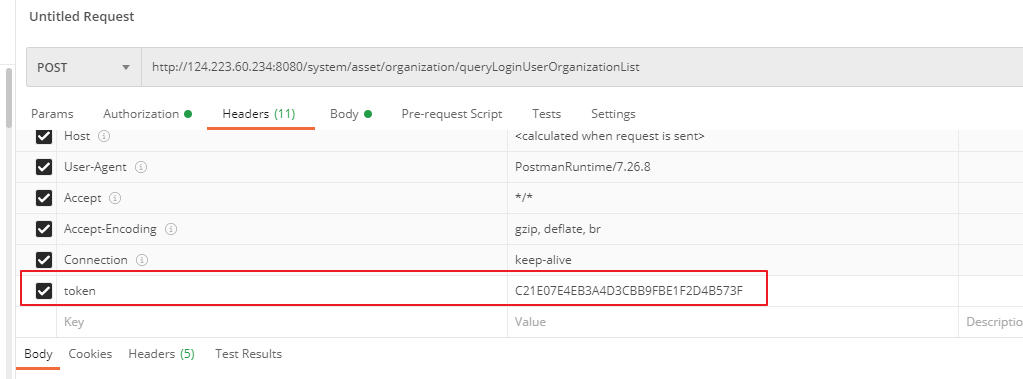
2.2.参数示例
无3.接口应答
3.1.返回示例
{
    "code": 200,
    "message": "Operation succeeded",
    "data": [
        {
            "id": 9,
            "title": "Query all sub-organizations under a specific organization",
            "categoryId": 5,
            "categoryName": "API Doc",
            "updatedAt": "2026-03-24T13:42:11",
            "previewUrl": "https://cloud.ucargo.ai:2443/doc/view/9"
        },
        {
            "id": 5,
            "title": "Initialize account",
            "categoryId": 1,
            "categoryName": "Quick Start",
            "updatedAt": "2026-03-24T08:53:00",
            "previewUrl": "https://cloud.ucargo.ai:2443/doc/view/5"
        },
        {
            "id": 12,
            "title": "Cargo Monitoring",
            "categoryId": 1,
            "categoryName": "Quick Start",
            "updatedAt": "2026-03-24T00:48:04",
            "previewUrl": "https://cloud.ucargo.ai:2443/doc/view/12"
        }
    ]
}
3.2.返回结果说明
| 字段 | 类型 | 说明 |
|---|---|---|
| code | int | 返回状态 |
| message | String | 返回结果描述 |
| data | object | 返回结果体 |
data说明
| 字段 | 类型 | 说明 |
|---|---|---|
| id | String | 文档ID |
| title | String | 文档标题 |
| categoryId | String | 文档类型ID |
| categoryName | String | 文档类型名称 |
| updatedAt | String | 修改时间 |
| previewUrl | String | 预览地址 |
Author:admin Create time:2026-03-24 14:06
Last editor:admin Update time:2026-06-22 15:00
Last editor:admin Update time:2026-06-22 15:00