1.URL
http://124.223.60.234:18080/tms/sysprofile/querySystemProfile
2.请求参数
2.1请求头
在Headers里面增加token:对应登录验证成功后,data里面对应的tokenId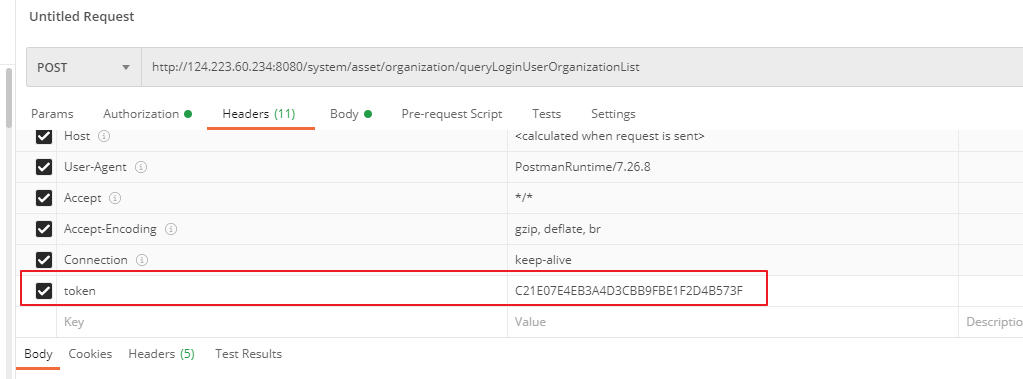
2.2.参数示例
{
    "domain":"cloud.ucargo.com"
}
3.接口应答
3.1.返回示例
{
  "code": 200,
  "message": "success",
  "data": {
    "id": "A1B2C3D4E5F6",
    "orgId": "ORG001",
    "userId": "USER001",
    "domain": "tms.example.com",
    "certificateKey": "-----BEGIN PRIVATE KEY-----...",
    "certificatePem": "-----BEGIN CERTIFICATE-----...",
    "systemName": "TMS 运输管理系统",
    "systemLogo": "https://example.com/logo.png",
    "truckText": "TMS",
    "systemIcon": "https://example.com/truck-logo.png",
    "loadingText": "系统加载中...",
    "copyright": "© 2026 Example Corp",
    "certificateStatus": 1,
    "certificateDeployTime": "2026-03-25 10:30:00",
    "certificateDeployMessage": "deploy success"
  }
}
3.2.返回结果说明
| 字段 | 类型 | 说明 |
|---|---|---|
| code | int | 返回状态码,200表示成功 |
| message | String | 返回结果描述信息 |
| data | object | 分页数据结果体 |
data说明
| 字段 | 类型 | 说明 |
|---|---|---|
| id | String | 证书记录唯一ID |
| orgId | String | 机构/组织唯一ID |
| userId | String | 用户唯一标识 |
| domain | String | 证书绑定域名 |
| certificateKey | String | 证书私钥 |
| certificatePem | String | 证书公钥/证书内容 |
| systemName | String | 系统名称 |
| systemLogo | String | 系统Logo地址 |
| systemIcon | String | 系统ICON的地址 |
| truckText | String | 货车上的文字 |
| loadingText | String | 加载文本 |
| copyright | String | 版权信息 |
| certificateStatus | int | 证书状态:1-部署成功/正常;2:部署失败 |
| certificateDeployTime | String | 证书部署时间 |
| certificateDeployMessage | String | 证书部署结果描述 |
| createTime | String | 创建时间 |
| createBy | String | 创建人用户ID |
| updateTime | String | 更新时间 |
| updateBy | String | 更新人用户ID |
| updateByName | String | 更新人姓名 |
Author:admin Create time:2026-03-26 16:45
Last editor:admin Update time:2026-06-22 15:00
Last editor:admin Update time:2026-06-22 15:00